Building better apps rarely requires a longer prompt. What matters is clearer decisions, constraints, and feedback. These practical patterns help Coderblock create and refine the right frontend, backend, database, and user flows.
A good Coderblock prompt does not need to look like a technical specification. You do not need to discuss frameworks, databases, APIs, or architecture. You can simply describe what you want to build and let the AI agents turn your idea into a real full-stack app using React, TypeScript, Tailwind CSS, authentication, and, when needed, a Postgres database.
That does not mean, however, that all prompts are equally effective.
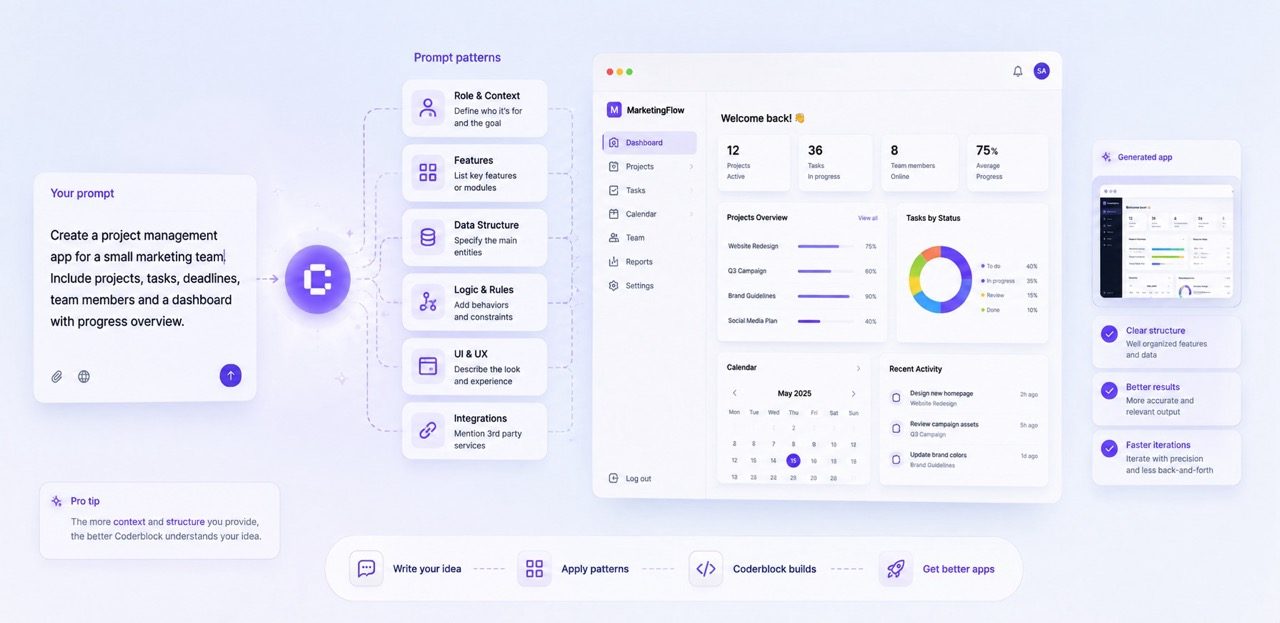
The clearer the context you provide, the easier it is for the agent to make useful decisions on your behalf. A good prompt does not describe every implementation detail. It clarifies what you are building, who it is for, how it should work, and which rules it must follow.
From there, you can let Coderblock handle the rest. Here are some patterns you can use to get better results and make each iteration more effective.
Start with the product, the user, and the outcome

A prompt such as “Create a dashboard” or “Build a booking app” may be enough to get started, but it leaves many questions unanswered. Who will use the app? What should they be able to do? What is the most important outcome you want to achieve?
A simple way to give the agent the right context is to start with three elements:
- Product: What kind of app are you building?
- User: Who will use it?
- Outcome: What should they be able to accomplish?
For example:
Create a booking platform for independent personal trainers. Trainers should be able to publish available sessions, while clients should be able to browse schedules, create an account, and book a time slot. Include a dashboard where trainers can manage upcoming bookings.
With this information, the agent already has a concrete model of the product. It can infer the main screens, roles, database entities, and navigation without requiring you to specify routes or a schema.
If you start with one of Coderblock’s templates, you can use the same approach to explain what you want to change or add. The template provides the starting point, and your idea is built on top of that structure.
Describe flows, not isolated features
A feature list explains what needs to be included. A flow explains how everything should work together. Instead of writing “add authentication, profiles, bookings, and email,” describe what happens when someone uses the product.
Try this:
A new visitor should be able to browse trainer profiles without signing in. When they choose a session, ask them to sign up or sign in, confirm the booking, and then display it in the My Bookings section. Trainers should only see bookings for their own sessions.
Now the agent understands the user journey: what is public, when authentication is required, what happens after a booking, and which data each role can access.
Based on these instructions, it can configure Supabase Auth, protected routes, sessions, tables, and Row Level Security to match the behavior you described. There is no need to request custom JWT logic, password hashing, or a separate password table. It is more useful to explain who should be able to access what and let Coderblock choose the appropriate implementation.
Separate requirements from preferences
Not every decision carries the same weight. A good prompt clearly distinguishes between what the app absolutely must do and what the agent is free to interpret.
For example:
Essential requirements: client sign-in, trainer profiles, availability, bookings, and separate views for clients and trainers. Visual preferences: a calm, editorial design, warm neutral colors, generous spacing, and minimal animation. The UX agent can decide the exact card layout.
This keeps the core functionality non-negotiable while giving the agents in the Agent Team room to make design and UX decisions.
Constraints can also be extremely useful. For example:
- Mobile-first or desktop-first approach
- Public pages or pages available only after authentication
- Required user roles
- Currency and billing interval
- Data that must remain private to each user
- Actions restricted to administrators
The rule is simple: specify the behavior, not necessarily how it should be implemented.
Describe data through relationships
When building an app, you do not necessarily need to think in terms of tables and migrations.
It is much more natural to describe the relationships that exist in the real world.
Coderblock gives standard web apps a dedicated Supabase project with Postgres and Row Level Security. This means you can explain how the data should be organized without manually writing the database schema.
For example:
Each trainer can create multiple session types. A session type includes a duration, price, and description. Available time slots belong to a trainer and can have no more than one confirmed booking. Clients should only see their own bookings, while trainers should see bookings associated with their own time slots.
Compared with simply saying “add a bookings table,” this description gives the agent much more information: which entities exist, how they are connected, which constraints they must follow, and who can access the data.
As the product evolves, continue describing changes in terms of behavior:
Add a cancellation reason and cancellation date and time to bookings. Clients can cancel up to 24 hours before a session, but only trainers can mark a booking as completed.
The agent can then update the existing structure without having to rebuild the app from scratch.
Make one change at a time—and make it observable
One of the most useful features of Coderblock’s live preview is the ability to quickly see the effect of every change. For this reason, after the initial generation, it is better to make focused follow-up requests instead of rewriting the entire brief each time.
For example:
Make the navigation bar sticky on desktop, but keep the header compact on mobile.
In the trainer dashboard, show today’s sessions before the weekly calendar.
Add an empty state to the My Bookings section with a button that takes users back to trainer search.
Each request produces a concrete result that you can immediately verify in the preview. This makes it easier to understand what worked, what needs to be fixed, and what the next step should be.
For larger changes, you can also ask the agent to work in stages:
First, add trainer roles and protected trainer routes. Then create the availability editor. Finally, connect available time slots to the client booking flow.
This turns even a complex feature into a sequence of easy-to-verify steps.
Do not forget states and edge cases
An app does not exist only in its happy path. What does a user see when they have no bookings yet? What happens if a payment fails? What if a time slot is no longer available? What does someone see if they try to access a restricted area?
You can describe these scenarios directly in your prompts:
- “Show a helpful empty state when the user has no bookings.”
- “Disable unavailable time slots and explain why they cannot be selected.”
- “Show a loading indicator while the booking is being submitted.”
- “If a non-admin user opens the admin route, redirect them safely.”
- “Make validation messages specific and place them next to the relevant fields.”
These are small details, but they make a significant difference between a prototype that works and a product that feels ready to use. You can also ask the UX or security agents to review an existing flow and suggest or apply improvements.
When adding payments, describe the business rule
To integrate payments, you do not need to explain how Stripe works. You need to explain what you are selling and what happens after payment. Specify at least the following:
- Product or service
- Price
- Currency
- Billing model
- Features available after purchase
For example:
Let clients subscribe for €9.99 per month. Subscribers can book premium sessions, manage their subscription from their account, and view their current billing status. Start in Stripe test mode.
In the default managed mode, the agent can create a managed Stripe account after asking for some basic information, such as your country and business name. It can then configure products, prices, checkout, and webhooks, while the setup required to receive payments can be completed later through the onboarding link hosted by Stripe.
If you prefer to use your own Stripe account, you can request BYOK mode. The agent will ask for STRIPE_SECRET_KEY through a secure environment variable prompt and configure the webhook automatically.
Secrets remain on the server and are never added to the chat or generated code.
Finish with a review prompt
Before publishing, you can ask the agents to make one final pass over the entire experience. For example:
Review the app as a first-time client, a trainer, and an administrator. Check the navigation, mobile usability, permissions, empty states, and the complete booking flow. Fix obvious issues without changing the visual direction.
This type of prompt works because it defines who should be simulated, what should be checked, and which boundaries must be respected.
After reviewing the preview, you can use Publish to deploy the app to its coderblock.app address or connect a custom domain from Settings → Domains.
The best prompt leaves room for AI
You do not need to write extremely long prompts to get good results with Coderblock. You need to give the agent the information that truly matters: who will use the product, what they should be able to do, how the flows should work, which data should be connected, which rules cannot be broken, and what should happen in different scenarios.
Everything else can be developed through iteration. Start with a clear brief. Review what is generated. Test the app. Then continue with small, concrete, verifiable requests.
That is the real advantage of working with an AI coding agent: you do not need to know in advance how to build the product. You need to know what you want to build.