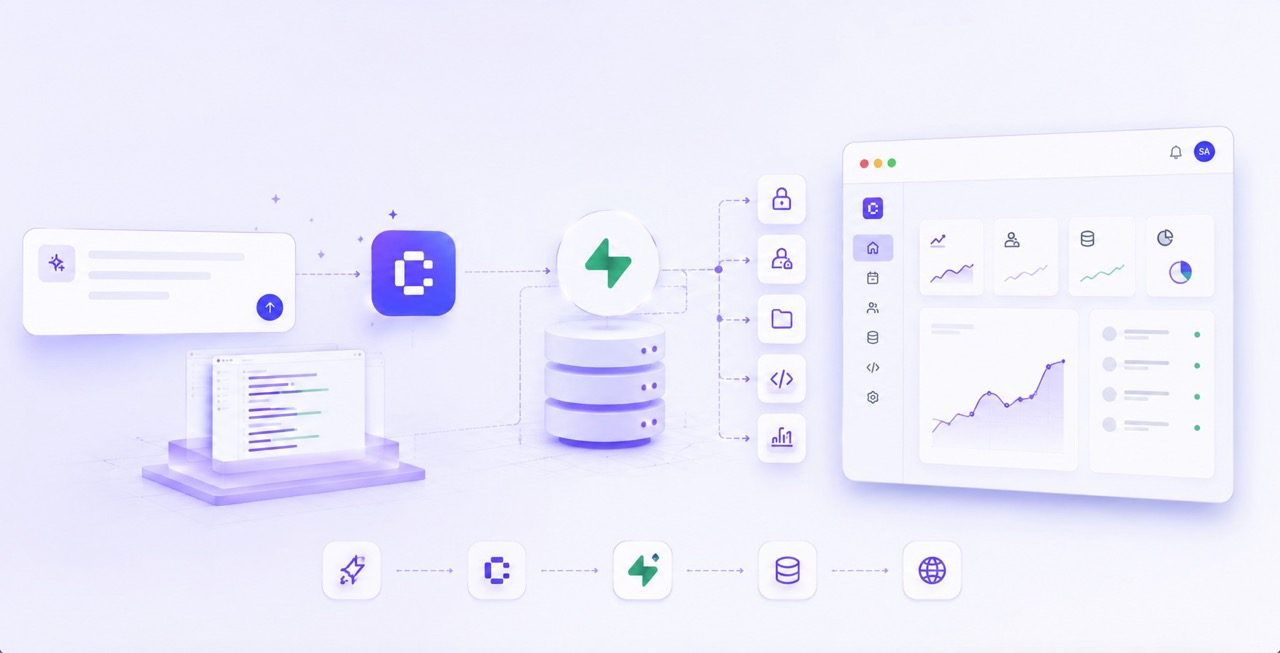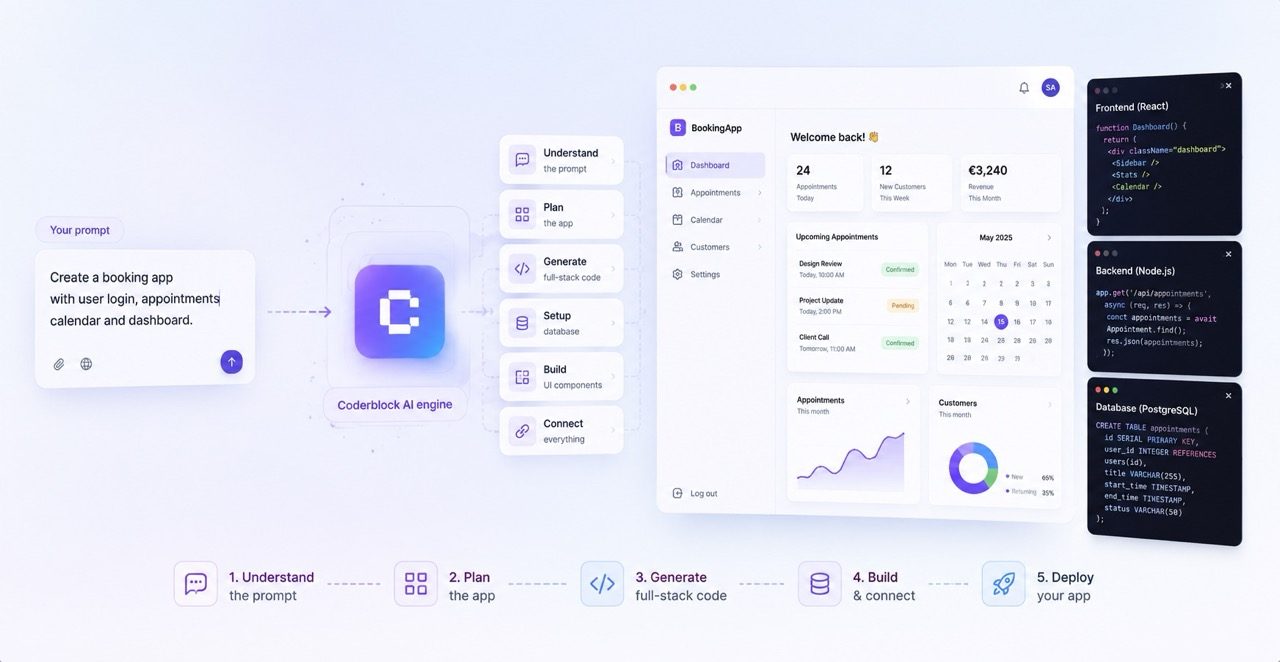
Coderblock turns a natural-language description into a working React application complete with a backend, database, authentication, and live preview. Here’s how its chat-based workflow connects every layer and enables continuous iteration.
An app can start with a single sentence. But turning that sentence into a working product requires much more: an interface, application logic, persistent data, authentication, permissions, file storage, payments, and infrastructure.
With Coderblock, these layers aren’t built separately. Describe what you want to create, and the platform generates a real full-stack web app, ready to test in a live development environment. From that point on, chat becomes your workspace: you can see what was built, try it out, and keep changing it simply by describing the result you want.
The first prompt, then, isn’t a final specification. It’s the beginning of a conversation with your product.
Start with a product description
 Your first prompt doesn’t need to contain every answer. It just needs to give the agent enough context to understand what you’re building, who it’s for, and which workflows matter most.
For example:
Your first prompt doesn’t need to contain every answer. It just needs to give the agent enough context to understand what you’re building, who it’s for, and which workflows matter most.
For example:
Create a booking platform for a small fitness studio. Visitors should be able to browse classes, create an account, reserve a spot, and view upcoming bookings. Staff need an admin dashboard to manage classes and attendance.
Those few lines already contain several connected elements: a public catalog, user accounts, bookings, personal areas, and an admin role. Coderblock uses this information to build the application end to end, from frontend to backend. If you want to get started faster, you can also choose from 32 available product templates covering use cases such as e-commerce, bookings, dashboards, wellness, and gaming. More than 20 feature templates also let you quickly add common elements such as authentication, payments, shopping carts, chat, and admin panels.
The template gives you a concrete foundation. Chat lets you turn it into your own version of the product.
From description to interface in seconds
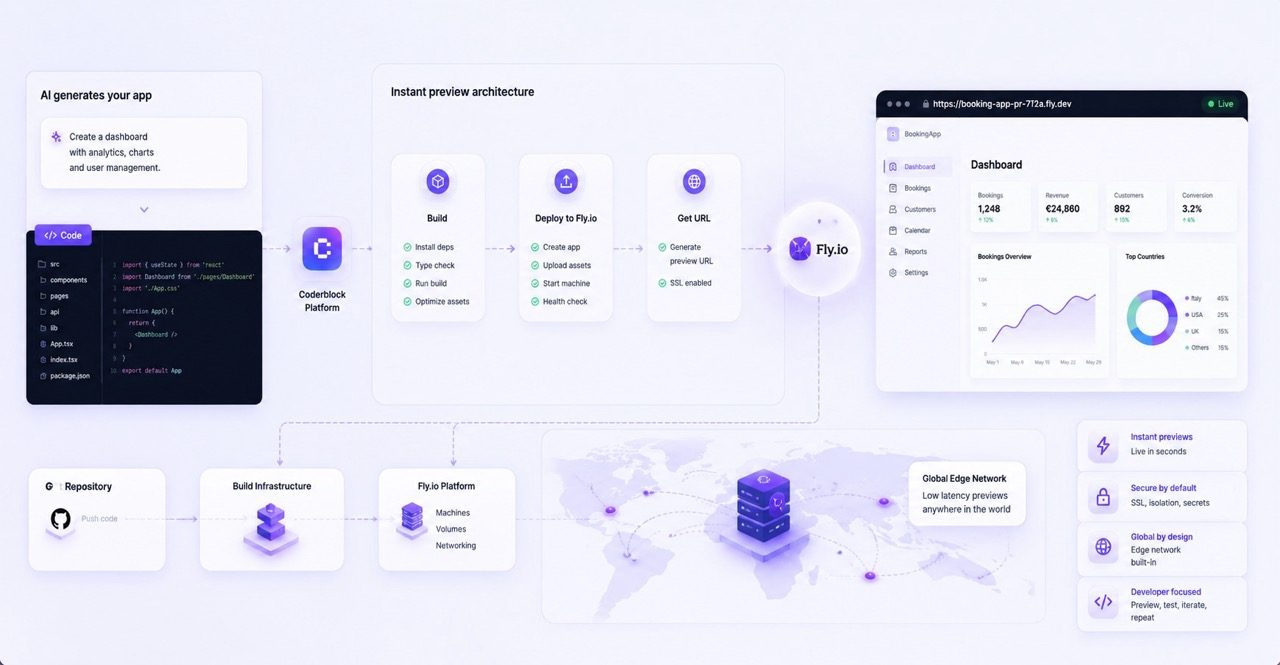
Coderblock generates the frontend using React, Vite, TypeScript, and Tailwind CSS, then immediately makes it available at a dedicated development address: <app>.coderblock.dev.
This is where your idea becomes something you can finally see and use.
And once a product starts taking shape, many decisions become easier to make. A dashboard may include every necessary feature but still have an ineffective visual hierarchy. A table may work but feel too crowded on mobile. A flow may be correct but could still use one fewer step.
Instead of returning to the original brief, you can simply continue the conversation:
- Make the navigation bar sticky and add a mobile menu.
- Show the remaining spots on each class card.
- Add filters for instructor and difficulty level.
- Create a weekly attendance view for staff.
- Use a more relaxing color palette and increase the contrast of the forms.
The preview updates within seconds thanks to hot reload.
The result is a very simple cycle: describe → view → test → refine
And every step brings the product a little closer to what you had in mind.
When the interface becomes a real app
At this point, you’re no longer working on a simple interface.
A real product needs persistent data, users, permissions, and backend logic. That’s why, for standard web apps, Coderblock connects the frontend to a dedicated Supabase project that includes Postgres, Supabase Auth, Storage, Row Level Security, and Deno Edge Functions.
The agent can design and update the database schema directly from the conversation. For the fitness studio, for example, it can translate the product into entities such as classes, schedules, profiles, and bookings, defining the relationships they need to work together.
And you can continue thinking entirely in product terms.
Add a waitlist when a class is full, and let staff admit the next person when a spot opens up.
This request doesn’t just change a screen. It may require new data, new rules, and new behaviors. Coderblock handles these changes as part of the same application, without asking you to configure API routes or migrations manually.
From the editor’s Backend tab, you can still see what’s behind the app: tables, authenticated users, storage, and functions. For Enterprise Web Platform projects, Coderblock instead uses a backend architecture based on Python, FastAPI, and Neon Postgres.
Data access follows the user’s identity
Once accounts and personal data exist, another essential question comes into play: who can see what? You can describe this directly in the conversation:
Add login and user accounts, with separate access for customers and staff.
Coderblock can configure Supabase Auth, registration and login pages, session management, and protected routes. Social login can also be added on request. Every app already includes a profiles table and a basic role structure, which the agent can use to build different experiences for customers, team members, and administrators.
But authenticating a user isn’t enough. Access rules must extend all the way to the data. With Row Level Security, for example, you can ensure that each customer sees only their own bookings, while staff can access the admin view.
That means there’s no need to build a JWT system manually, manage passwords with custom logic, or create dedicated credential tables. Identity is handled by Supabase Auth, while policies define what each user can do with the data.
Payments also start in chat
When your product is ready to monetize, you don’t need to switch tools. You can simply add a new request:
Let members pay €9.99 per month.
Coderblock can handle the Stripe flow end to end: products, prices, checkout, interface, and backend logic. In the default managed mode, the agent sets up a Stripe account for the project after collecting a few basic details, such as the country and business name. No API keys are required, and the platform handles the payment webhook. Payout setup and identity verification can be completed later through the hosted Stripe link provided by the agent.
If you prefer to use your own Stripe account, you can choose BYOK mode. In this case, Coderblock requests STRIPE_SECRET_KEY through a secure environment-variable prompt and automatically configures the webhook.
The secret remains server-side and is never added to the generated code or chat.
The same approach is used for other integrations that require credentials. Applications can also add AI features through the OpenAI-compatible Coderblock AI Gateway, using a project-specific API key with metered usage.
As the project grows, Agent Teams step in
The more complex an app becomes, the more its decisions span different areas.
A new admin panel may require simultaneous changes to the frontend, database, permissions, and security. A new feature may affect both the UX and how users interact with the product.
That’s why Coderblock provides Agent Teams: AI agents specializing in areas such as frontend, backend, UX, security, and marketing. You can bring them into the project to address specific needs without losing the application’s context. The advantage isn’t simply having more agents. It’s being able to maintain a unified product vision while solving different problems with specialized expertise.
The initial prompt, then, never becomes a static document. It remains the starting point for a conversation that evolves alongside the app.
From development to production
When the product is ready, moving from preview to production is just as straightforward.
With Publish, the app is deployed to <app>.coderblock.app, with SSL included. Later releases can use fast hot updates, so you can continue improving the product without rebuilding the deployment process from scratch.
If you want to use a custom domain, you can connect it from Settings → Domains by following the guided DNS setup.
Alternatively, you can purchase the domain directly through Coderblock, with checkout, DNS, and SSL all managed within the platform.
For teams that want to integrate Coderblock into their development workflow, GitHub integration is also available.
A conversation that becomes a product
The journey starts with a description, but it doesn’t end with the first generation.
Describe the idea. See it take shape. Test the app. Add context. Refine it. Publish it.
That’s Coderblock’s conversational development model. The value of a prompt doesn’t lie in anticipating every detail of the application before you begin. It lies in giving the AI enough context to build a working first version—and enough flexibility to keep improving it with you.
In other words, you don’t have to design everything before you start building. You can build, see, and decide as you go.