AI code generation combines language models, project context, software tools, and validation loops to turn an instruction into working software. This lesson explains the core process, the differences between app-building agents and autocomplete tools, and where human judgment remains essential.
From natural language to executable software
 Building software from a sentence can feel almost magical: you describe what you want, wait a few seconds, and the AI generates the code.
But there is much more behind that simple interaction than a model that merely “writes code.”
Building software from a sentence can feel almost magical: you describe what you want, wait a few seconds, and the AI generates the code.
But there is much more behind that simple interaction than a model that merely “writes code.”
To turn a request such as “build a platform for booking fitness classes” into a working application, an AI system must first understand the intent, gather project context, decide how to implement the feature, modify multiple parts of the stack, and verify that everything still works.
At the heart of this process is a Large Language Model (LLM). During training, an LLM learns the relationships among natural language, programming languages, documentation, configuration, and recurring software patterns. It does not simply look up a ready-made solution in a hidden database: it generates a sequence of tokens—the units that make up text and code—based on the request and the available context.
This also explains why generating code does not automatically mean generating correct software. A model can produce valid syntax and familiar structures, yet the result may still contain bugs, missing dependencies, or architectural decisions that do not suit the project. That is why modern AI coding systems do not rely on the model alone. They support it with context, tools, rules, and validation loops.
How AI code generation works
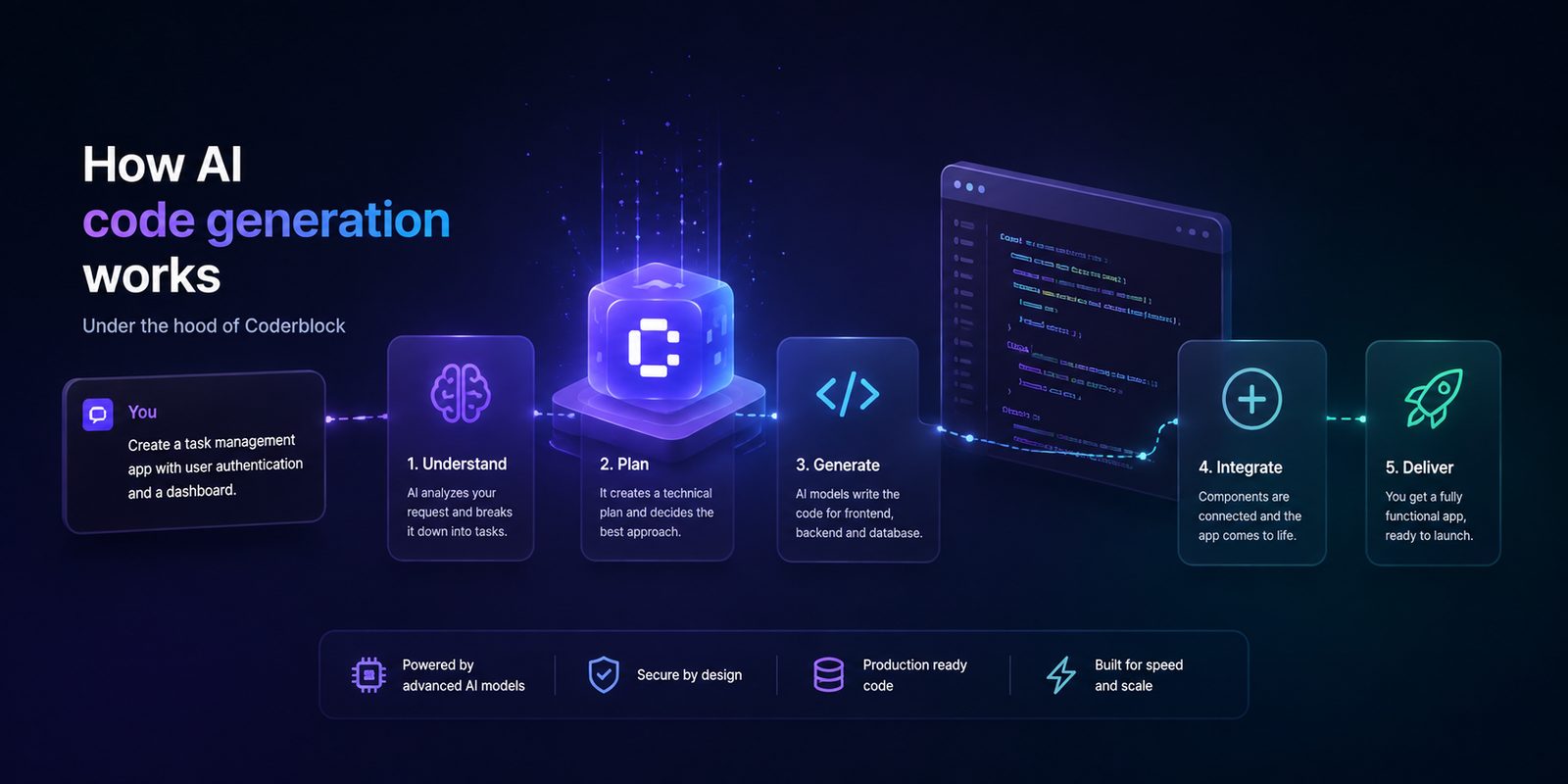
The process can be simplified into five stages:
understand the request → gather context → plan → generate → validate and improve
It is not simply an input-output operation. It is a continuous loop in which each step influences the next.
1. Understand what you want to build
Everything starts with the prompt. Imagine writing:
“Build a booking platform for fitness instructors.”
For a human, this sentence may be enough to start a conversation. For a system that must turn it into software, however, it leaves many questions unanswered.
Who will use the app? What actions can each user perform? What data needs to be stored? How will availability be managed? Are payments required? Are there different roles? What information must remain private?
The system must therefore turn a general request into a set of technical requirements. The more information you provide, the less room there is for interpretation.
Some of the most useful details to include are:
- users and roles involved;
- actions each user can perform;
- data that needs to be stored;
- relationships among the data;
- required integrations, such as Stripe;
- visual preferences and responsive behavior;
- privacy and authorization rules.
AI can, of course, make assumptions when information is missing. But every assumption increases the chance that the final result will differ from what you had in mind. That is why iterative conversation is one of the most important aspects of AI coding: you do not have to describe everything in the first prompt. You can start with an idea, review the result, and keep specifying what you want to change.
2. Gather context
Understanding the request is not enough. If you are modifying an existing app, the AI must also understand where and how to make changes. A Large Language Model operates within a context window: the set of instructions, code, and information it can consider during a given operation.
In a real project, this context may include:
- relevant source files;
- folder structure;
- database schema;
- previous conversation messages;
- frameworks and libraries in use;
- project configuration;
- errors produced during execution.
Choosing the right context is essential. If too little is provided, the model may miss an important dependency. If too much is provided, relevant information may get lost in the noise. More advanced systems therefore try to select the information that is genuinely useful for the requested change, rather than treating every project file equally. In Coderblock, the conversation is linked directly to the project. This allows the agent to work with the app’s actual context, making changes to both the frontend built with React, Vite, TypeScript, and Tailwind CSS and the Supabase backend using Postgres, Auth, Storage, Row Level Security, and Edge Functions.
3. Plan work across the entire stack
A new feature rarely affects just one file.
Consider bookings again. Adding them correctly might require:
- a new database table;
- relationships with users and services;
- access rules;
- a booking form;
- data validation;
- a page for viewing bookings;
- an admin dashboard;
- state and error handling.
The system must therefore understand how all these parts fit together. This is where agentic approaches come into play: instead of merely generating a block of code, the AI can break the problem into tasks and coordinate changes across different areas of the project.
Coderblock’s Agent Teams, for example, include agents dedicated to the frontend, backend, UX, and security. The goal is not simply to generate more code, but to maintain consistency across the different layers of the app. A field used on the frontend must match the corresponding field in the database. A role defined in the interface must have consistent access rules. A feature visible to users must have a backend capable of handling it correctly.
4. Generate and apply changes
At this point, the model can produce the required code and changes. This is where one of the most important differences between a chatbot that generates code and a true AI app builder becomes clear. A chatbot may show you a function and ask you to copy it into your project. An app builder can instead apply the change directly to the application.
In Coderblock, for example, you can start in the chat and ask:
“Add login and user accounts.”
The agent can configure Supabase Auth, create sign-up and sign-in screens, manage sessions, protect routes, and set up Row Level Security policies. This means you do not need to create a password table manually or build authentication management from scratch.
The same applies to the database. If you ask:
“Add a bookings table and an admin view.”
The agent can design and apply the changes to the Postgres schema, connect them to the interface, and make the result available in the application. The Backend section then lets you review elements such as tables, authenticated users, storage, and functions.
Autocomplete, AI assistants, and agents: what is the difference?
AI code generation is not a single technology. Some tools work on one line of code at a time, while other systems can work across an entire application.
Autocomplete tools
These tools offer the experience closest to traditional coding. As you type, the AI suggests the next line or block of code. They are especially useful when the developer already understands the architecture and knows exactly where to make changes. However, control of the project remains primarily in the developer’s hands: integration, configuration, and testing must be handled separately.
Conversational coding assistants
Chat-based AI assistants go one step further. They can explain code, analyze files, find errors, and generate more complex functions or components. They are highly effective at speeding up a developer’s work, but they often still require someone to transfer changes into the project, manage the repository, configure services, and run tests.
AI agents for building applications
An AI app-building agent operates at an even higher level.
It does not treat code as a collection of isolated snippets, but considers the application as a complete system.
Starting from a natural-language request, it can coordinate changes to the frontend, backend, database, authentication, and deployment.
In Coderblock, you can start with a description of your idea or choose one of the available product templates.
The generated application is made available through a live development environment on coderblock.dev, where you can continue modifying it through the conversation.
For example, you can say:
“Make the navigation bar sticky.”
or:
“Add Google sign-in.”
and continue iterating on the project without starting over. Coderblock can also use multiple AI models, including leading models such as Claude and GPT, selecting the most suitable approach for each type of task.
Generation is only half the job
One of the biggest misconceptions about AI coding is that plausible output must be correct. It is not.
Generated code may contain:
- syntax or type errors;
- missing imports;
- incompatible dependencies;
- incorrect assumptions about the project structure;
- runtime errors;
- misconfigured permissions;
- database migration issues.
That is why validation is an integral part of generation. Some of the most important checks include:
- TypeScript syntax and type analysis;
- application builds;
- running available tests;
- analyzing runtime and browser errors;
- validating database migrations;
- testing permissions with different roles;
- checking key user flows;
- verifying responsive behavior.
A live preview is particularly useful during this process.
In Coderblock, you can immediately see the result of a change, identify what is not working, and describe the required fix directly.
The process therefore becomes: prompt → generation → preview → feedback → new change
This loop is what makes the experience more powerful than the idea of producing a perfect app with a single prompt.
Security: AI-generated code must follow the rules too
The fact that code was generated by AI does not change the fundamental rules of security.
- Private credentials must not be exposed in the frontend
- API keys must not be committed to the repository
- Authorization must not rely solely on the interface
When a Coderblock project requires a secret, the agent can use a secure request specifically designed for environment variables. The value is stored in the project’s server-side secrets vault and is not inserted into the generated code.
An example: integrating Stripe
Payments clearly illustrate why an AI app builder needs tools, not just a language model. You can ask the agent to add a monthly payment system through Stripe. Depending on the configuration, Coderblock can create a managed Stripe account, generate products and prices, configure checkout, and set up the webhook.
Alternatively, you can connect an existing Stripe account using a secret key entered through the secure environment variable workflow. In either case, the project can be tested in test mode before moving to production.
Authentication also requires a backend
The same principle applies to login. A sign-in screen is not enough to protect data. If a user manages to bypass the interface, database rules must still prevent them from accessing information that does not belong to them. That is why Coderblock apps use a dedicated Supabase project, with a structure for profiles and roles and Row Level Security to enforce policies directly at the database level.
How to get better results from AI code generation
You do not necessarily need to write extremely long prompts. It is more useful to provide clear goals, users, constraints, and expected behavior.
Instead of trying to describe every implementation detail, you can let the AI propose a solution and then refine it through further iterations. For more complex projects, it is best to proceed in stages:
- Define the data model.
- Configure authentication and roles.
- Build the main user flow.
- Add integrations and payments.
- Create administrative features.
- Refine the UI, responsive behavior, and micro-interactions.
After each stage, verify the result. Test the main user journey. Check empty and error states. Test the different roles. Verify what data each user can read or modify. If something does not work, you do not necessarily need to start over. You can describe the problem and request a targeted fix. Finally, always keep external credentials in secure environment variables and use version control tools such as GitHub when the project requires a more structured development workflow.
From generation to publishing
AI code generation changes how software is built, but it does not eliminate the development process. It makes that process faster and, above all, more accessible.
With Coderblock, you can go from describing an idea to a working application, continue modifying it through chat, and review what you are building in real time.
When the project is ready, you can publish it with one click to a dedicated coderblock.app address with SSL included, or connect a custom domain through Settings.
The true value of AI code generation, therefore, is not simply its ability to write code faster. It lies in the ability to turn natural language into a complete development process: understanding an idea, building the software, testing it, fixing it, and taking it to production. AI does not replace the process. It makes it much closer to the way people think about and describe what they want to build.