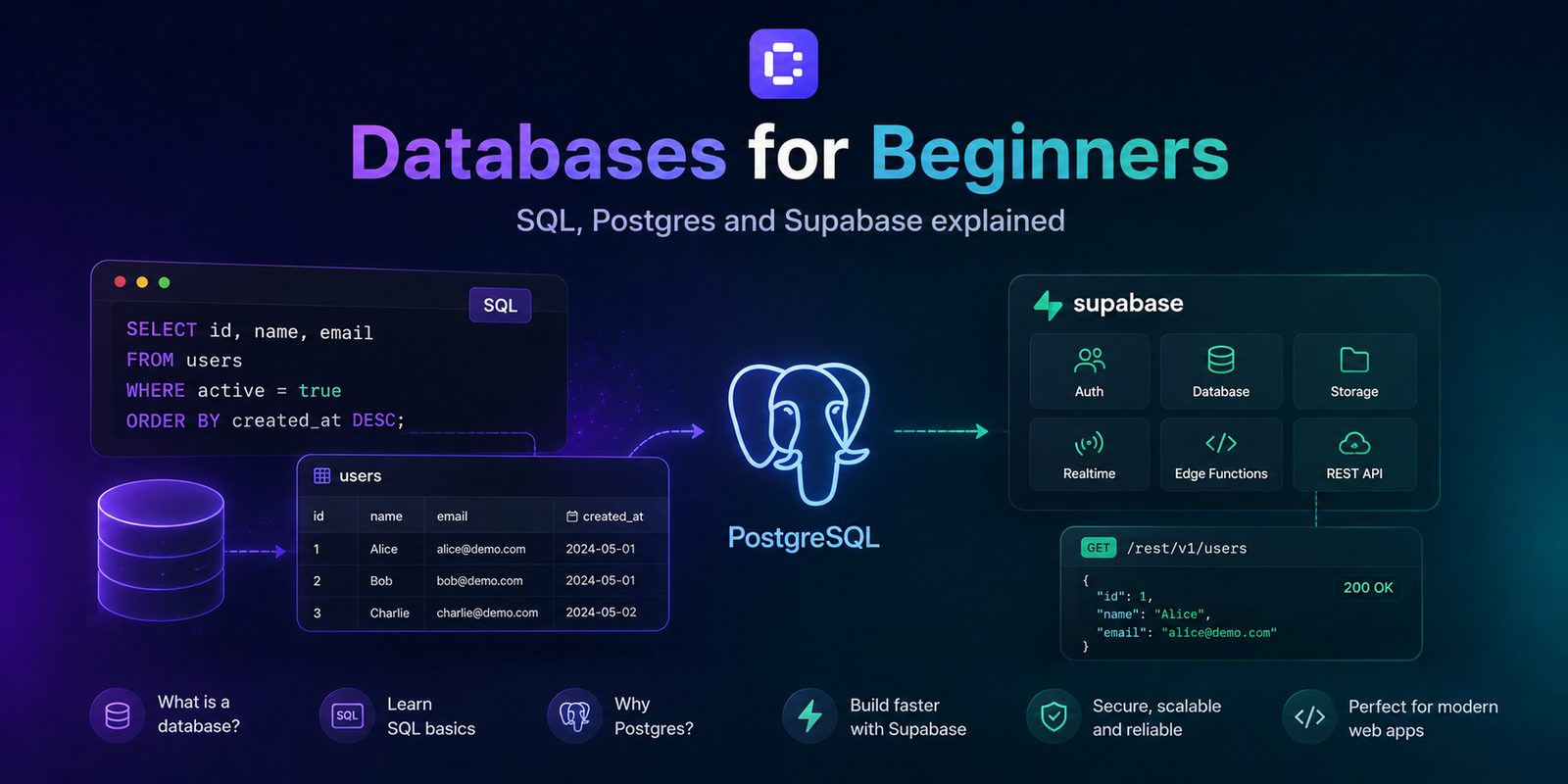
Learn how relational databases organize information, how SQL works, and why Postgres and Supabase are often used together in modern web apps. This lesson also covers schema design, security, and practical database workflows in Coderblock.
Why web apps need databases

An application can display a screen, collect information, or perform an action. But what happens when it needs to remember something?
A booking platform needs to remember customers, services, and appointments. An e-commerce store needs to manage products, orders, and inventory. A SaaS platform needs to know which users have an account, which projects they have created, and which permissions they have.
That is why databases exist.
A database is where an application stores the information it needs in a structured, persistent way. Without a database, much of that data might exist only temporarily in the browser. Once the page is closed, it could be lost. With a database, the app can save information and retrieve it later, across different devices and for different users.
A database is the app's memory
You can think of a database as an application's permanent memory.
The frontend displays information. The backend applies the logic. The database stores the data.
In a booking app, for example:
Frontend → displays services and the calendar Backend → checks availability and permissions Database → stores users, services, and bookings
There are several types of databases. Document databases work with flexible documents, key-value databases are optimized for certain kinds of fast access, while relational databases organize data into connected tables. SQL and Postgres primarily belong to this world. Supabase, meanwhile, builds a collection of backend services for web applications around Postgres.
Relational databases: tables, rows, and relationships
A relational database organizes information into tables. Each table generally represents one type of entity. In a booking platform, you might have:
profiles→ users;services→ available services;bookings→ bookings.
Inside each table, you will find:
- columns, which describe the properties of the data;
- rows, which represent individual records;
- primary keys, which uniquely identify each record;
- foreign keys, which connect records from different tables;
- constraints, which prevent invalid data from being saved.
For example, a booking might contain a profile_id and a service_id.
This tells you exactly who made the booking and which service they selected, without having to copy all the user and service information into every individual booking.
Why are relationships important?
Imagine that a service changes its name. If the name were copied into every booking, you would have to update hundreds or thousands of records. With a relational database, the booking can simply reference the correct service. Relationships between data therefore help reduce duplication and inconsistencies while keeping the product model more organized.
What is a database schema?
Before creating a database, you need to decide how to organize the information. The collection of tables, columns, relationships, data types, and constraints that defines this structure is called a schema. Good schema design means making the database reflect how the product actually works.
Before creating a new table, ask yourself:
- What does each record represent?
- Which information is required?
- Which values must be unique?
- Which entities need to be connected?
- Who can read or modify this data?
The goal is not to create as many tables as possible. One enormous table containing completely different kinds of information can become difficult to manage. At the same time, putting every small piece of data into a separate table can make the system unnecessarily complex.
A good schema balances data consistency, query simplicity, and the product's real requirements.
What is SQL?
This is where SQL, short for Structured Query Language, comes in. SQL is the language used to interact with many relational databases.
You can use it to:
- create structures;
- read data;
- add records;
- modify information;
- delete records;
- connect data from different tables.
The four fundamental operations are often summarized with the acronym CRUD:
- Create → create
- Read → read
- Update → update
- Delete → delete
A simple example
Suppose we want to retrieve the bookings made by a specific user. An SQL query might look like this:
SELECT id, start_time, status
FROM bookings
WHERE profile_id = 42
ORDER BY start_time;
In practical terms, we are saying:
“Give me the IDs, times, and statuses of user 42's bookings, sorted by time.”
SQL can also combine information from different tables. For example:
SELECT bookings.start_time, services.name
FROM bookings
JOIN services ON services.id = bookings.service_id;
This query connects bookings to their corresponding services so that it can return the service name along with the booking time.
SQL is declarative
An important characteristic of SQL is that it is a declarative language. You do not necessarily have to explain every individual step the database should take to find a piece of information. You tell it what result you want, and the database decides how to execute the query.
SQL is also a widely used standard, although different systems may offer their own features and extensions. You do not need to learn everything at once. Understanding concepts such as SELECT, filters, JOINs, grouping, constraints, and transactions is already enough to build a strong foundation.
What is Postgres?
It is important to make a distinction here: SQL is the language. Postgres is the database.
Postgres, or more precisely PostgreSQL, is an open-source relational database management system. It is the software that stores data, enforces constraints, and interprets SQL queries.
You can think of the relationship this way:
SQL → the language you use to communicate Postgres → the system that stores and manages the data
Postgres supports essential features such as:
- primary keys and foreign keys
- transactions
- indexes
- views
- constraints
- advanced data types
Why are transactions important?
Imagine an e-commerce store. When a customer purchases a product, the system may need to:
- create the order;
- reduce the inventory;
- record the payment.
These operations are connected. If the first succeeds but the second fails, you could end up with a recorded order but inventory that was never updated.
Transactions let you treat multiple operations as a single unit: either they all complete successfully, or the database can restore the previous state.
What about indexes?
Indexes make certain searches faster. If an application repeatedly needs to find a user's bookings on a specific date, an index can make that operation much more efficient. But indexes are not free: they take up space and require additional work whenever data is modified.
That is why automatically indexing every column is not a best practice. An index should support a real query pattern in the product.
What is Supabase?
If Postgres is the database, Supabase is a backend platform built around Postgres. It does not replace Postgres.
Instead, it adds a range of services commonly needed to build web applications, including:
- authentication and session management;
- file storage;
- database administration tools;
- server-side functions;
- data APIs;
- Row Level Security.
The most important distinction to remember is:
SQL is the language. Postgres is the database. Supabase is a backend platform that uses Postgres and adds services for building applications.
This combination is particularly useful for web apps because it lets you manage data, users, files, and permissions within an integrated infrastructure.
Authentication and authorization: two different things
Here, too, it helps to separate two concepts. Authentication means:
“Who is this user?”
Authorization means:
“What is this user allowed to do?”
Supabase Auth can handle registration, login, and sessions. Row Level Security (RLS) can determine which database rows a particular user is allowed to read or modify. Imagine a booking platform. A customer should be able to see:
their own bookings.
An administrator, on the other hand, might be able to see:
all bookings.
Both are authenticated users, but they have different permissions.
Security cannot depend on the frontend alone
Hiding a button in the interface does not prevent someone from performing an operation. A user could try to send a request directly to the backend.
That is why access rules must be enforced in the backend and the database, not only in the interface. This is where Row Level Security becomes important: it lets you define access rules directly at the database level.
How databases work in Coderblock
In standard Coderblock web apps, every project has a dedicated Supabase environment with Postgres, Auth, Storage, Deno Edge Functions, and Row Level Security. A basic profile structure and an initial role system are also included by default.
The difference is that you do not necessarily need to start by configuring the database manually. You can describe what you want to build through the chat.
For example:
“Add services with a duration, price, and active status.”
Then:
“Create bookings linked to authenticated users.”
And then:
“Prevent customers from seeing other customers' bookings, and create an admin view for managing all of them.”
The agent can design the schema, apply migrations, connect the React frontend to the backend, and configure the required RLS policies. In the editor's Backend section, you can then inspect tables, authenticated users, storage, and functions.
The live preview updates as you continue modifying the app through the conversation.
The best prompt is not “create a database”
When working with an AI app builder, it is not enough to ask:
“Create a database for a booking app.”
It is much more helpful to describe the product model. Specify:
- the main entities;
- what information they should contain;
- how they are connected;
- which fields are required;
- which users can access the data;
- which actions they can perform.
This gives the AI the information it needs to turn a product description into a consistent data structure.
Database best practices for beginners
You do not need to be a database engineer to avoid the most common mistakes.
Use stable identifiers
Every important table should have a primary key. Avoid using data such as names or email addresses as permanent identifiers because they can change.
Keep rules close to the data
Frontend validation is useful for the user experience, but it should not be the only safeguard. Use:
- required fields;
- unique constraints;
- foreign keys;
- appropriate data types;
- access policies.
This allows the database to protect data integrity regardless of where a request comes from.
Follow the principle of least privilege
Each user should have only the permissions they need to do their job. Test the app with different roles:
- anonymous visitor;
- authenticated user;
- administrator.
Always verify what each role can read, create, modify, or delete.
Manage the schema through migrations
Databases change along with products. When you add a new feature, you may need to create a table, add a column, or modify a relationship. Using controlled migrations lets you track these changes and reduces the risk of losing existing data. Before deleting a column or changing a structure, always make sure it is no longer being used.
Model the product, not the screen
This may be the most important rule. A table should represent a real product concept, not simply a screen in the interface. A dashboard's design may change completely. A customer, booking, or order still represents the same entity. Thinking about the data model first also makes it easier to evolve the frontend in the future.
SQL, Postgres, and Supabase: what you really need to remember
If you are just getting started, you do not need to memorize dozens of terms.
Keep this relationship in mind:
SQL → the language used to query and modify data Postgres → the relational database that stores data and executes queries Supabase → the backend platform that uses Postgres and adds authentication, storage, APIs, functions, and tools for building web applications
In Coderblock, these concepts are integrated into the app-building process. You can describe in natural language what your application needs to remember, how the data should be connected, and who can access it. The agent can handle the full-stack implementation while you review and refine the result through the chat.
Understanding how databases work therefore helps you do something even more important: describe what you want to build more clearly. You do not necessarily need to write SQL. But knowing what tables, relationships, roles, constraints, and permissions are will help you turn an idea into an application that does more than display data—it can truly store, connect, and protect it.